
One of the biggest trends in video right now is the tilt-shift effect. You know those videos where people look like miniature toys, running around at hyper speed? That”s a quintessential tilt-shift effect video! For a classic example, check out The Sandpit by Sam O”Hare:
Now, you may be wondering, just how did Sam manage to shrink down all those big construction machines, boats and helicopters? Well, he didn”t! It”s a perceptual illusion caused by the tilt-shift effect. Let”s dig a little deeper to explain.
Without getting too complicated, the physics of light and the mechanics of the human eye result in certain patterns in our everyday visual perception. For example, a scenic hillside view will appear to have a large depth of field, meaning most everything in the field of view appears in focus. Conversely, when your eyes focus on a nearby object, only that object will appear in focus while everything else in your frame of view will be blurry. (This is known as a narrow or shallow depth of field!) Over time, your brain learns to use depth of field as a visual cue that indicates an objects” distance.
What does all this crazy science mean? It explains why tilt-shift videos make large objects like vehicles, trees, and even people appear miniature-like. Keep in mind that almost every tilt-shift video has a narrow depth of field. Namely, only a small zone of the whole video frame is in focus. This makes us perceive the subject matter as being minuscule. It”s akin to watching a trail of ants– only a portion of your field of view will be in focus. With time, your brain is trained to associate depth of field with an objects” distance. To help illustrate this illusion, let”s look at a still image from Keith Loutit”s hit video Bathtub IV:
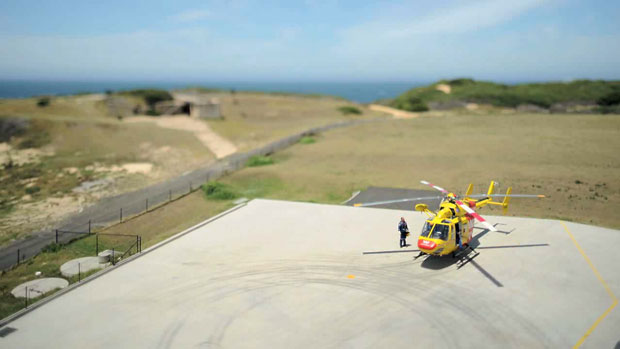
Notice how only a portion of the lower third of the frame is in focus, around where the helicopter and person are positioned. That narrow depth of field, when used on a large sweeping vista, makes us perceive the the whole scene as existing at a small scale. The illusion is further amplified by the downward angle at which most of these videos are shot, making it seem like you”re looking down at a miniature set. Additionally, many tilt-shift videos are color saturated to exaggerate natural colors, making the objects seem more toy-like. Finally, some tilt-shift videos feature sped up video or accelerated time lapses. This adds to the perception of the subjects in the shot being very small, since the only time you really see objects moving so rapidly, relative to their size, is typically with insects or other small objects.
Now that we understand what the tilt-shift effect looks like, let”s discuss how it”s actually accomplished. There are two primary ways you can go about it, either use a tilt-shift lens or apply it as an effect in post-production with software. First let”s go over the lens method. Our fine friends at Still Motion made this solid tutorial video to help demystify the intricacies of tilt-shift lenses, have a look:
Originally, tilt-shift lenses were used by photographers to generate still images for special conditions. However, the surge in popularity of time lapse videos led to an explosion of interest in these extremely versatile lenses. Let”s recap the difference between tilt vs shift lens movement with the handy diagram below-
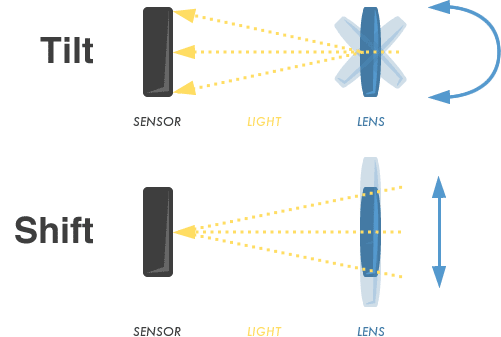
Normal lenses allow you to focus on a subject with all the light in the foreground and background of the shot being out of focus. The area of a shot where the light is actually in sharp focus is known as the “plane of focus”. With a tilt movement, the lens can be pivoted left or right, relative to the image sensor. This allows for the plane of focus to extend at new angles where the left side of the shot is in focus but the right isn”t, and vice versa. If you play around with tilt movement, you can get selective focus, which is basically the miniaturizing effect described above. Now, with a shift lens movement, the lens can be moved up and down parallel to the image sensor. What this accomplishes is pretty amazing. If you want to shoot something head on but are stuck at an off angle, you can use the shift feature to make it appear as though the camera was right in front of the subject. It”s a pretty gnarly feature and definitely something worth experimenting with. If you don”t have access to a tilt-shift lens there are several programs with features that allow you to mimic the effects via some form of image editing. Here are a few tutorials for some of the more popular programs-
As you may of already guessed, tilt-shift has broad applications beyond what we”ve covered here. Maybe you”ll end up making a sweet action sports video like Tristan Greszko”s A Tiny Day in the Jackson Hole Backcountry? However you apply tilt-shift, have fun with it and experiment. You might be surprised what comes out of your camera!
[challenge: It”s time to try your hand at tilt-shift! Make your first tilt-shift effect video and post it by clicking here!, url: http://vimeo.com/groups/tiltshiftandtimelapse]
You can also leverage other cutting edge tools from Vimeo like our AI script generator, video teleprompter, AI caption generator, and AI video translator.